I made this widget at MyFlashFetish.com.

Memaparkan catatan dengan label Chapter 14. Papar semua catatan

11 April 2011

History of Programming Languages and Their Evolution

First language
Ada Lovelace and Babbage and its nephew were writing programs for the project of "difference engine", and then the "analytical engine".
In 1945, the german K. Zuse, inventor of the Z3 computer would have defined an evolved language for this engine (with arrays and records). Few documents of the epoch about this language exist.

Assembly
Fsd
Assemblers exist since the beginning of computers. They associate a symbolic name to the machine-language code, for example:
  add bx, 4       
  cmp [adr], 3  
  jmp address
Assembly programming is no longer frequently practiced, even to build fast routines...

Autocode - 1952
Alick E. Glennie
Implemented firstly on Mark 1, then on other computers, this is a symbolic code.
IPL - 1956 - Information Processing Language
A. Newell, H. Simon, J.C. Shaw
Low-level list processing language. Implements the RECURSIVITY.

to learn more, please clik to:-
History of Programming Languages and Their Evolution

Most Popular Computer Programming Language

Computer programmers have been writing code for 50 years. New technologies continue to emerge, develop, and mature at a rapid pace. Now there are more than 2,500 documented programming languages. It is very difficult to measure which programming language are most popular.

Available jobs are a pretty good indicator of the number of development projects for a given language. Java pretty much dominates in this area, with C# coming in a distant second, and ASP.NET and PHP not too far behind.  Not a bad showing for Microsoft, actually.

To see more, please clik here :-
Most Popular CPL

10 April 2011

FUNGSI BAHASA PENGATURCARAAN


Fungsi utama Bahasa Pengaturcaraan (Programming Language) ialah untuk membenarkan Juruaturcara menyampaikan hasratnya bagi proses perkomputeran, dengan lebih mudah berbanding dengan apa yang mereka boleh lakukan dengan Bahasa Tahap Rendah atau Kod Mesin. Disebabkan tujuan ini, Bahasa Pengaturcaraan secara amnya direkabentuk untuk menggunakan sintaks tahap tinggi, yang lebih mudah difahami oleh Juruaturcara. Bahasa Pengaturcaraan adalah peralatan yang penting bagi membantu Jurutera Perisian (Software Engineer) untuk menulis Aturcara(program) yang lebih baik dengan lebih cepat.

Pemahaman terhadap Bahasa Pengaturcaraan adalah penting bagi mereka yang mendalami bidang Sains Komputer. Ini adalah kerana sebarang bentuk proses perkomputeran dilakukan dengan Bahasa Komputer. Dalam beberapa dekad kebelakangan ini, kebanyakan Bahasa Komputer telah diperkenalkan, bersilih-ganti, dan telah diubahsuai atau digabungkan. Walaupun terdapat beberapa percubaan untuk menghasilkan hanya satu Bahasa Pengaturcaraan universal yang boleh diguna untuk pelbagai tujuan, namun kebanyakan percubaan ini telah gagal. Beberapa Bahasa-bahasa Pengaturcaraan lain masih diperlukan kerana:

  • Penggunaannya yang berbeza dari segi penghasilan perisian perniagaan, sains, serta hobi.
  • Sesetengah Bahasa Pengaturcaraan tidak sesuai digunakan oleh pengguna baru, dan memerlukan kepakaran.
  • Juruaturcara mempunyai citarasa tersendiri
  • Masa larian mungkin berbeza bagi aturcara yang *dilarikan pada pengawal mikro(microcontroller), dengan aturcara yang dilarikan pada Superkomputer. *”dilarikan” di sini bermaksud melancarkan aturcara

Terdapat pelbagai Bahasa dengan fungsi khusus dan digunakan untuk situasi tertentu:

  • PHP ialah Bahasa Pengskripan yang digunakan dalam pembangunan web
  • Perl lebih sesuai untuk memanipulasi perkataan
  • Bahasa C lebih luas penggunaan dalam pembangunan Sistem Pengoperasian dan Pengkompil

Bahasa Pengaturcaraan membolehkan aturcara komputer kurang bergantung pada mesin atau persekitaran tertentu sahaja. Ini kerana Bahasa Pengaturcaraaan ditukar menjadi kod mesin untuk mesin tertentu, dan bukan dilarikan secara terus oleh mesin. Ini merupakan tujuan utama penghasilan Bahasa Pengaturcaraan FORTRAN, (salah satu daripada Bahasa Pengaturcaraan yang pertama), iaitu ketidak-bergantungan terhadap mesin.
Terdapat 2 mekanisme yang digunakan untuk menterjemah sesuatu aturcara, yang ditulis dalam Bahasa Pengaturcaraan, kepada kod mesin tertentu pada komputer:

  • Mekanisme kompilasi
  • Mekanisme Penterjemah

Mekanisme Kompilasi
Mekanisme terjemahan yang menterjemah teks aturcara secara keseluruhan dan kemudian melarikan format dalamannya. Aturcara Pengkompil menerima teks aturcara(dikenali sebagai Kod Sumber) sebagai data input, dan membekalkan kod objek sebagai output. Kod Objek yang dihasilkan adalah kod mesin yang boleh dilarikan secara terus oleh CPU komputer, atau kod yang padan dengan spesifikasi Mesin Maya(Virtual Machine)

Mekanisme Penterjemah
Mekanisme terjemahan yang menterjemah kod aturcara pada masa-larian(runtime), di mana setiap langkah yang diterjemah dilarikan terus. Penghasilan aturcara dengan cara ini biasanya dilarikan lebih lambat berbanding aturcara yang dikompil. Bagaimanapun, ianya lebih fleksibel kerana boleh berinteraksi dengan persekitaran larian. Untuk lebih lanjut, lihat Bahasa Pengaturcaraan Diterjemah(?)(Interpreted Language). Bahasa Pengaturcaraan yang mengguna cara ini dikenali sebagai Bahasa Pengaturcaraan Pengskripan.
Kebanyakan Bahasa Pengaturcaraan boleh diterjemah dengan kedua-dua cara, tetapi kebanyakannya lebih sesuai untuk salah satu cara.

Adakah korang tahu? Apa bahasa pengaturcaraan pertama di dunia?
Ia adalah LISP dan FORTRAN.. sehingga ke hari ini, 2 jenis bahasa pengaturcaraan itu masih di gunapakai oleh para programmer dan hackers elit sedunia (Terutamanya adalah LISP..)

07 April 2011

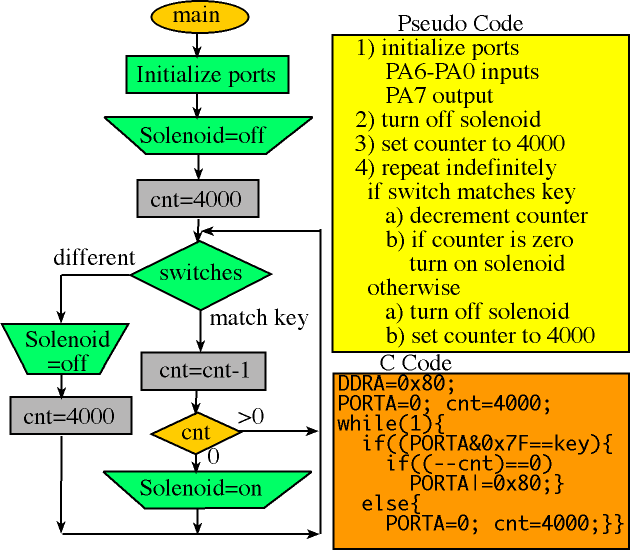
Pseudocode


What is pseudocode?

Pseudocode consists of short, English phrases used to explain specific tasks within a program's algorithm. Pseudocode should not include keywords in any specific computer languages. It should be written as a list of consecutive phrases. You should not use flowcharting symbols but you can draw arrows to show looping processes. Indentation can be used to show the logic in pseudocode as well. For example, a first-year, 9th grade Visual Basic programmer should be able to read and understand the pseudocode written by a 12th grade AP Data Structures student. In fact, the VB programmer could take the other student's pseudocode and generate a VB program based on that pseudocode.

Why is pseudocode necessary?

The programming process is a complicated one. You must first understand the program specifications, of course, Then you need to organize your thoughts and create the program. This is a difficult task when the program is not trivial (i.e. easy). You must break the main tasks that must be accomplished into smaller ones in order to be able to eventually write fully developed code. Writing pseudocode WILL save you time later during the construction & testing phase of a program's development.

How do I write pseudocode?

First you may want to make a list of the main tasks that must be accomplished on a piece of scratch paper. Then, focus on each of those tasks. Generally, you should try to break each main task down into very small tasks that can each be explained with a short phrase. There may eventually be a one-to-one correlation between the lines of pseudocode and the lines of the code that you write after you have finished pseudocoding.

It is not necessary in pseudocode to mention the need to declare variables. It is wise however to show the initialization of variables. You can use variable names in pseudocode but it is not necessary to be that specific. The word "Display" is used in some of the examples. This is usually general enough but if the task of printing to a printer, for example, is algorithmically different from printing to the screen, you may make mention of this in the pseudocode. You may show functions and procedures within pseudocode but this is not always necessary either. Overall, remember that the purpose of pseudocode is to help the programmer efficiently write code. Therefore, you must honestly attempt to add enough detail and analysis to the pseudocode. In the professional programming world, workers who write pseudocode are often not the same people that write the actual code for a program. In fact, sometimes the person who writes the pseudocode does not know beforehand what programming language will be used to eventually write the program.

Example:

Original Program Specification:

Write a program that obtains two integer numbers from the user. It will print out the sum of those numbers.

Pseudocode:

Prompt the user to enter the first integer
Prompt the user to enter a second integer
Compute the sum of the two user inputs
Display an output prompt that explains the answer as the sum
Display the result

References :

http://www.minich.com/education/wyo/stylesheets/pseudocode.htm

Differences between "Do Until" and "Do While"

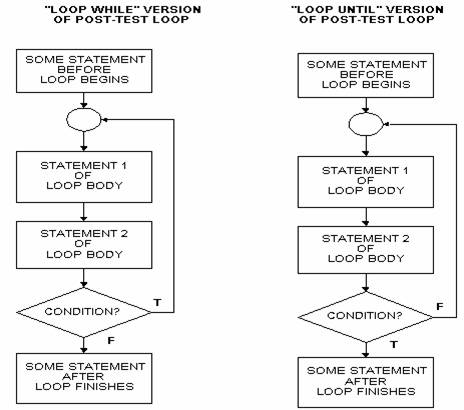
The difference between "do while" and "do until" is that a "do while" loops while the test case is true, whereas "do until" loops UNTIL the test case is true (which is equivalent to looping while the test case is false).


The difference between a "do ...while" loop and a "while {} " loop is that the while loop tests its condition before execution of the contents of the loop begins; the "do" loop tests its condition after it's been executed at least once. As noted above, if the test condition is false as the while loop is entered the block of code is never executed. Since the condition is tested at the bottom of a do loop, its block of code is always executed at least once.

To further clear your concept on this, understand the syntax and description of the two loop types:

while
The while loop is used to execute a block of code as long as some condition is true. If the condition is false from the start the block of code is not executed at al. The while loop tests the condition before it's executed so sometimes the loop may never be executed if initially the condition is not met. Its syntax is as follows.

while (tested condition is satisfied)
{
block of code
}

In all constructs, curly braces should only be used if the construct is to execute more than one line of code. The above program executes only one line of code so it not really necessary (same rules apply to if...else constructs) but you can use it to make the program seem more understandable or readable.

Here is a simple example of the use of the while loop. This program counts from 1 to 100.


#include

int main(void)
{

int count = 1;

while (count <= 100)
{
printf("%d\n",count);
count += 1; // Notice this statement
}

return 0;

}

Note that no semi-colons ( ; ) are to be used after the while (condition) statement. These loops are very useful because the condition is tested before execution begins. However i never seem to like these loops as they are not as clear to read as the do ...while loops. The while loop is the favorite amongst most programmers but as for me, i definitely prefer the do ...while loop.

do ....while
The do loop also executes a block of code as long as a condition is satisfied.

Again, The difference between a "do ...while" loop and a "while {} " loop is that the while loop tests its condition before execution of the contents of the loop begins; the "do" loop tests its condition after it's been executed at least once. As noted above, if the test condition is false as the while loop is entered the block of code is never executed. Since the condition is tested at the bottom of a do loop, its block of code is always executed at least once.

Some people don't like these loops because it is always executed at least once. When i ask them "so what?", they normally reply that the loop executes even if the data is incorrect. Basically because the loop is always executed, it will execute no matter what value or type of data is supposed to be required. The "do ....while" loops syntax is as follows

do
{
block of code
} while (condition is satisfied);


Note that a semi-colon ( ; ) must be used at the end of the do ...while loop. This semi-colon is needed because it instructs whether the while (condition) statement is the beginning of a while loop or the end of a do ...while loop. Here is an example of the use of a do loop.

include

int main(void)
{

int value, r_digit; printf("Enter a number to be reversed.\n");
scanf("%d", &value); do
{
r_digit = value % 10;
printf("%d", r_digit);
value = value / 10;
} while (value != 0); printf("\n"); return 0;


}

References :

http://wiki.answers.com/Q/What_is_the_difference_between_do_while_and_do_until_loop_in_c_programing